
Reaching the right people at K-12 schools isn’t easy. Superintendents, curriculum directors, IT administrators, and principals all have different responsibilities, different purchasing authority, and different email addresses. A large contact list helps you very little if it includes the wrong job titles, stale records, or schools that don’t match your target market.
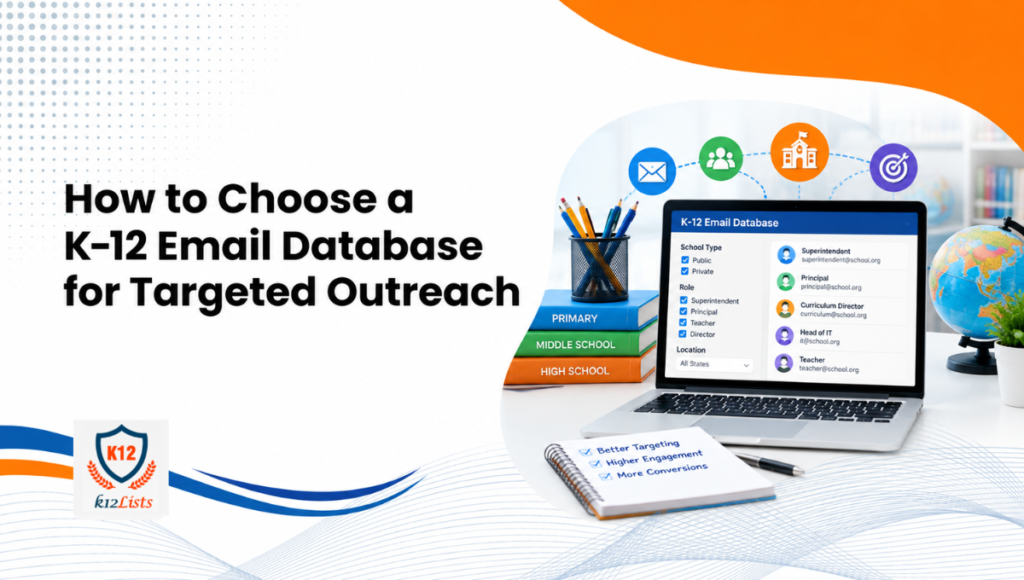
Before buying any K-12 email database, evaluate it across eight areas: contact coverage, field completeness, segmentation options, data freshness, email verification methods, compliance practices, export usability, and provider support. Each criterion affects whether you’ll reach the right people or waste your outreach budget.
It’s worth noting that school contact research used to mean manual work: printed directories, school website lookups, district publications, and cross-referencing professional association membership lists. As education technology markets grew and school structures became more complex, maintaining separate records for hundreds of institutions across multiple roles became impractical. Digital contact databases emerged to solve that problem, shifting the focus from bulk list collection to organized, verifiable, role-specific professional data. That shift also raised the bar for what “good data” actually means.
What Should You Look for in a K-12 Email Database?
A useful K-12 email database isn’t defined by its total contact count. It’s defined by how closely its available records match your actual target audience. Before evaluating specific providers, confirm that a database can deliver:
- Relevant professional contacts (principals, IT leads, curriculum directors, purchasing staff)
- Complete contact fields (email, job title, institution name, location, enrollment)
- Role-based and geographic segmentation
- Clear data maintenance and verification practices
- Applicable compliance documentation
- Practical export options for your CRM or outreach platform
Audience relevance and record quality matter more than raw numbers. A smaller list of accurate, targeted contacts will outperform a larger list full of outdated or irrelevant records.
Check Whether the Database Includes the Right Contact Fields
Essential Contact Information for B2B Outreach
The minimum fields for usable outreach are a professional email address and a job title. But useful databases typically include much more: contact name, school or district name, institution type (public, private, or charter), geographic location (state, county, city, or zip code), website, enrollment size, grade levels served, and in some cases department or program type.
Not every provider offers every field. Ask specifically which fields are available before purchasing, and request a sample record to confirm the format.
Match Contact Fields to Your Campaign Goals
The fields you actually need depend on what you’re selling and who makes the buying decision. A vendor selling classroom management software probably needs school technology administrators and district-level technology directors. A curriculum publisher may prioritize curriculum coordinators and instructional leaders. An institutional services company might focus on purchasing contacts and district administrators.
If a database doesn’t include job title data, you can’t segment by role. If it lacks enrollment size, you can’t distinguish small rural schools from large urban districts. Think through the fields your campaign requires before comparing providers.
Evaluate Segmentation by Job Role, School Type, and Location
Target the Right School and District Decision-Makers
K-12 schools employ a wide range of professionals: superintendents, assistant superintendents, principals, assistant principals, curriculum directors, department heads, IT directors, technology coordinators, librarians, and purchasing managers, among others. Their responsibilities vary considerably across districts and states. A principal at a small independent school may handle technology purchasing directly. At a large district, that decision runs through a dedicated IT department.
So the job title alone doesn’t always tell you who the right contact is. Evaluate whether the database includes enough job-title granularity for your product category.
Filter by Institution Type
Public schools, private schools, and charter schools have different governance structures, budget sources, and procurement processes. A vendor targeting federally funded programs may focus exclusively on public schools. A provider selling premium learning tools may find private schools a better fit. If your product has eligibility requirements tied to institution type, this filter becomes essential.
Narrow Your Audience by Geography and Institution Size
Geographic filters let you focus outreach on specific states, metro areas, or school districts rather than sending broadly across the country. Enrollment filters help segment by school size, which can reflect budget capacity and purchasing complexity.
Two practical examples: A cybersecurity company targeting district IT leaders would benefit from filtering by district size and role, focusing on technology administrators at mid-to-large public districts. An educational publisher pursuing curriculum adoption decisions might filter by grade level served, subject area, and superintendent or curriculum director contacts in selected states. These aren’t hypothetical. They’re the kinds of targeting decisions that determine whether a campaign finds qualified leads or generates noise.
Assess Data Freshness and Update Frequency
Ask When Contact Records Were Last Verified
Professional roles in K-12 education change frequently. Principals move between schools. Curriculum directors are promoted or reassigned. Districts reorganize. An email address that was valid 18 months ago may now bounce or reach the wrong inbox. Before purchasing, ask when the records were last verified and how often the provider reviews its data.
Understand the Provider’s Data Maintenance Process
The answer “our data is regularly updated” doesn’t tell you much. A clearly documented maintenance process, one that explains how records are sourced, when email addresses are revalidated, and how role changes are identified, is more useful than a vague freshness claim. Some providers use automated email validation tools on a rolling basis. Others supplement automated checks with manual research. Ask the provider to explain their process specifically.
Review the Data Correction Policy
What happens when you discover an invalid address or an incorrect job title? A good provider will have a clear correction or replacement policy. Check whether that policy is documented, and understand the process before you commit to a purchase. There’s no single update frequency that’s right for every use case. What matters is that the provider can explain how data quality is maintained and what recourse you have when records fall short.
Verify Email Quality and Validation Methods
Understand What Email Verification Checks
Email verification typically includes syntax checks (is the address formatted correctly?), domain checks (does the domain exist?), and mail-server checks (does the server accept mail for that address?). Each layer removes different categories of invalid addresses. That said, some institutional email systems are difficult to validate conclusively through automated tools. Shared inboxes, filtering systems, and institutional mail configurations can return inconclusive results.
Ask About Accuracy Claims and Guarantees
When a provider claims a high deliverability or accuracy rate, ask what that metric actually measures, when the records were last checked, and what exceptions apply. A documented correction or replacement policy adds more credibility than a percentage alone.
Distinguish Email Validity from Deliverability
A valid email address doesn’t guarantee inbox placement. Whether your message reaches the inbox depends on sender reputation, email authentication (SPF, DKIM, DMARC), your sending platform’s policies, and the recipient’s mail server configuration. These are factors you control, not the database provider. Don’t expect a contact list to solve deliverability issues that originate in your sending infrastructure or campaign practices.
Review Data Sources and Email Marketing Compliance
Understand How Contact Information Is Sourced
Ask the provider where its contact data comes from. Reputable providers should be able to explain whether records are sourced from publicly available professional directories, government databases, school websites, or other identifiable methods. Transparent sourcing reduces uncertainty about permitted uses. Publicly accessible professional information isn’t automatically unrestricted for every marketing purpose. The permitted use depends on the context of collection and applicable law.
Check Applicable Email Marketing Regulations
In the United States, commercial email to business recipients is generally governed by the CAN-SPAM Act. The FTC’s compliance guide outlines the key requirements: accurate sender identification, honest subject lines, a valid physical postal address, a clear opt-out mechanism, and prompt processing of opt-out requests (within 10 business days). Each violation can carry a civil penalty. Requirements can differ depending on the recipient’s location, the sender’s jurisdiction, and the nature of the message. Consult the FTC’s official guidance and seek legal advice for your specific situation.
Keep Student Information Separate from Professional Contact Data
COPPA (the Children’s Online Privacy Protection Act) and FERPA (the Family Educational Rights and Privacy Act) address student data protections in distinct ways. COPPA governs online collection of personal information from children under 13. FERPA protects the privacy of student education records maintained by federally funded educational institutions. A professionally sourced K-12 contact database covers educators and administrators, not students. Purchasing a contact list doesn’t make your subsequent marketing campaign compliant. Your outreach practices, opt-out handling, and sender identification all carry their own obligations.
Check Export Formats, CRM Compatibility, and Usability
Confirm Available Export Formats
Most providers offer CSV and Excel exports. Confirm the export format before purchasing and check that field names are labeled clearly and consistently. Formatting inconsistencies can create extra data preparation work.
Review CRM Compatibility and Data Preparation
Importing contacts into a CRM such as HubSpot, Salesforce, or Marketo requires field mapping, duplicate handling, and sometimes data normalization. A cleanly formatted export reduces preparation time. Ask the provider whether their export format is compatible with your platform, and check whether they offer guidance on import setup.
Make Sure the Database Fits Your Workflow
If your team runs frequent, segmented outreach campaigns, ease of use and selective export options matter considerably. The ability to pull targeted subsets rather than exporting the entire database each time saves time and keeps your CRM cleaner.
Compare Provider Support, Sample Access, and Pricing
Request a Sample Before Making a Decision
A sample dataset lets you review actual records before purchasing. Check the field coverage, formatting, job title variety, and apparent recency of the sample. Ask whether the sample is representative of your intended audience, not just a curated showcase.
Understand Custom Counts and Pricing
Most reputable providers will offer a custom audience estimate based on your filtering criteria. This tells you whether the available contact pool is large enough to support your campaign before you pay for it. Compare providers using equivalent targeting criteria so you’re evaluating like for like.
Evaluate Ongoing Support
A provider that offers correction procedures, documentation, and responsive support for data-quality questions is worth more than one that’s difficult to reach after purchase. Ask how errors are handled and what the turnaround is for replacement records. For teams evaluating an education-sector option, the K-12 Schools Email List offers a free sample request and custom audience counts, with exports available in CSV or Excel and segmentation by school type, grade level, role, and geography.
How to Compare K-12 Email Database Providers
Evaluate every provider against the same criteria before making a decision. This comparison framework gives you a consistent structure:
| Evaluation Criterion | What to Compare |
|---|---|
| Audience coverage | Relevant schools and districts covered |
| Contact fields | Professional email, job title, institution name, location, enrollment |
| Segmentation | Available filters for your target roles, institution types, and geography |
| Data freshness | Last verification date and documented maintenance process |
| Email validation | Verification methods used and their limitations |
| Compliance | Source transparency and applicable regulatory documentation |
| Usability | Export formats, field labeling, and CRM compatibility |
| Support and pricing | Sample access, custom counts, and issue resolution process |
How to Choose the Right K-12 Contact Database for Your Campaign
Work through these steps before committing to a purchase:
- Define the product or service you’re marketing to schools.
- Identify the professional roles most likely to be involved in that purchase decision.
- Select the institution types and geographic markets that match your product’s fit.
- Establish the specific contact fields and segmentation criteria your campaign requires.
- Request a sample and a custom audience count from shortlisted providers.
- Review verification practices, compliance documentation, export options, and support procedures.
- Compare providers against the same requirements before deciding.
How K-12 Contact Data Requirements May Change in the Future
A few realistic developments are worth keeping in mind when selecting a provider for longer-term use. Buyers are becoming more demanding about proof of data quality. Claiming accuracy without documentation is increasingly insufficient. Expect greater scrutiny of verification methods, source transparency, and correction policies. Segmentation requirements are also becoming more granular: job responsibility, grade level served, institution type, and purchasing role are becoming standard filter expectations rather than premium features. There’s also a growing expectation that contact databases integrate cleanly with CRM and outreach workflows rather than requiring extensive manual preparation.
Future-ready selection prioritizes maintainable data quality, transparent sourcing, adaptable segmentation, and practical usability. Database size is a secondary consideration.
Find the Right K-12 Contacts for Your Campaign
Define your target school types, locations, and professional roles before estimating the audience you need. Explore the K-12 Schools Email List to determine whether its available coverage fits your outreach requirements.
Get a Custom CountFrequently Asked Questions
A K-12 email database is a collection of verified professional contact records for educators and administrators at K-12 schools and school districts. Businesses use these records to reach relevant decision-makers, such as principals, curriculum directors, IT administrators, and purchasing staff, as part of targeted B2B outreach campaigns.
A useful K-12 contact database should include professional email addresses, contact names, job titles, school or district names, institution type, geographic location, and where available, enrollment size, grade levels served, and department information. The fields you need depend on your product and the roles involved in the purchasing decision.
There’s no single answer. What matters more than update frequency is whether the provider can explain their verification process, tell you when records were last reviewed, and show evidence of ongoing maintenance. Verification date and maintenance documentation are more reliable quality indicators than a general “regularly updated” claim.
Request a representative sample and review the field coverage, formatting, and job title variety. Ask about the verification method used, when records were last checked, and what the correction policy is if you find invalid addresses. Transparent answers to these questions are a reasonable indicator of data quality.
That depends on the provider’s contact coverage and job-title data. Databases that include role-based segmentation let you filter by professional category, so you can focus on administrators, technology leads, or curriculum staff rather than pulling all available contacts indiscriminately. Confirm which roles are available before purchasing.
Your target audience size depends on the roles you’re pursuing, the institution types and geographic markets you’re targeting, and your campaign structure. Request a custom count from your shortlisted providers based on your specific criteria. That count will tell you whether the available pool is large enough to support your planned campaign volume.